Gmail CRM Integration: Every Customer Email on the Right Record
Connect a Google Workspace or Gmail inbox to KudosCRM with a Google sign-in. Sent and received email is matched to the contact and deal it belongs to and shown on their timeline, and your sequences go out from the Gmail address customers already know.

The Short Version
What Is the Gmail CRM Integration?
The Gmail CRM integration links a Google Workspace or Gmail inbox to KudosCRM so that email with customers is logged on the matching contact and deal automatically. Each rep connects their own inbox through Google's sign-in screen; KudosCRM stores an encrypted token, never the password.
The same connection is what email sequences and one-off sends use, so follow-ups leave from your real Gmail address and replies come back to you. Admins verify the sending domain in Email settings so bulk mail reaches inboxes.


The Problem
Email Lives in One Inbox, the Deal Lives Somewhere Else
Most teams on Google Workspace still forward threads, paste summaries into notes, or ask a colleague what the customer said. The Gmail integration removes that step.
Without the integration
- Customer replies sit in one rep's Gmail. Cover for them and you start from zero.
- Reps forward or BCC emails into the CRM, and forget half of them.
- Follow-up tools send from a generic relay address, so replies land in the wrong place.
- Managers read deal notes that say "emailed them" with no thread to check.
How KudosCRM handles it
- Sent and received Gmail is matched to the contact and deal and shown on the timeline.
- Nothing to forward. Each rep connects once with a Google sign-in.
- Sequences and one-off sends go through your real mailbox and appear in your Sent folder.
- The full thread is on the record, so "emailed them" becomes a conversation anyone can read.
How It Works
The Gmail Email Loop
From sign-in to a logged conversation, this is the path every message takes.
Step 1
Connect
Click Connect on the Gmail card and allow access on Google's own consent screen.
Step 2
Match
Sender and recipient addresses are matched to contacts by email.
Step 3
Log
Sent and received email appears on the timeline, grouped by thread.
Step 4
Send
Replies and sequences leave from the same Gmail address.
Step 5
Act
Workflows react: post to Slack, create a task, move the deal.
Email on the Record
Every Gmail Thread Shows Up on the Contact and Deal
Messages to and from a known contact appear on their timeline, grouped into threads rather than scattered as separate activities. A reply to an email you sent from a deal files back onto that deal.
- Contact matching by email address; opens, clicks and replies feed email tracking on the same record
- Your Gmail labels and filters stay exactly as they are
- Works for Google Workspace accounts and personal @gmail.com

Sign in With Google
OAuth Connection, No API Keys and No Stored Password
Click Connect on the Gmail card and Google's own consent screen opens. KudosCRM receives a scoped token that is encrypted at rest and isolated to your workspace. The connection runs through the Gmail API with a refresh token, and you can disconnect from Settings or from your Google Account's third-party access page.
- Settings → Connected apps shows the connection's status
- Test the connection, reconnect or read its sync history from the same sheet
- No support ticket needed to unplug a mailbox

Send From Your Mailbox
Sequences and Replies Leave From Your Real Gmail Address
One-off emails and multi-step sequences send through the connected mailbox, so they sit in your Gmail Sent label and replies come back to you.
- Rich-text signature from Email settings rides along on every send
- Template performance over 7, 30 or 90 days in Email settings
- Admins verify the sending domain so bulk campaigns land in inboxes

Templates and Merge Tags
Reusable Emails That Still Send From Gmail
Pick a template from any composer or campaign, and merge tags like {{contact_first_name}} and {{deal_name}} fill from the record. Built-in templates cover intros, follow-ups, quotes and renewal notices; shared ones carry your team's wording.
Because sends go through your connected Gmail inbox, templated emails look and land like anything else you write by hand.

What's in the Box
What the Gmail Integration Includes Today
Live capabilities are listed plainly. Anything not yet shipped carries a label.
- Sent and received email on the contact timeline
- Thread grouping
- Contact matching by email address
- Opens, clicks and replies in email tracking
Sending
- One-off sends from your Gmail address
- Email sequences through the connected mailbox
- Rich-text signature
- Template performance over 7, 30 or 90 days
Admin
- OAuth tokens encrypted at rest
- Status, test connection and sync history
- Sending domain verified in Email settings
- KudosCRM meetings added to Google Calendar with a Meet link
Admin View
Where Do Admins Verify the Sending Domain?
Settings → Email has two tabs. Accounts lists each connected Gmail inbox with its signature and daily sending quota, beside your templates, their performance over 7, 30 or 90 days, and the suppression list. Sending & domains is where an admin verifies the company domain your inboxes send from, with the DNS records to add and their status.
Verify the domain once and every connected inbox on it is covered, so campaigns and sequences reach inboxes instead of spam.

See It in the Product
How to Connect Gmail to KudosCRM?
Three screens, about two minutes. You need a KudosCRM login and a Google account; admin rights are not needed to connect your own inbox.
- 1
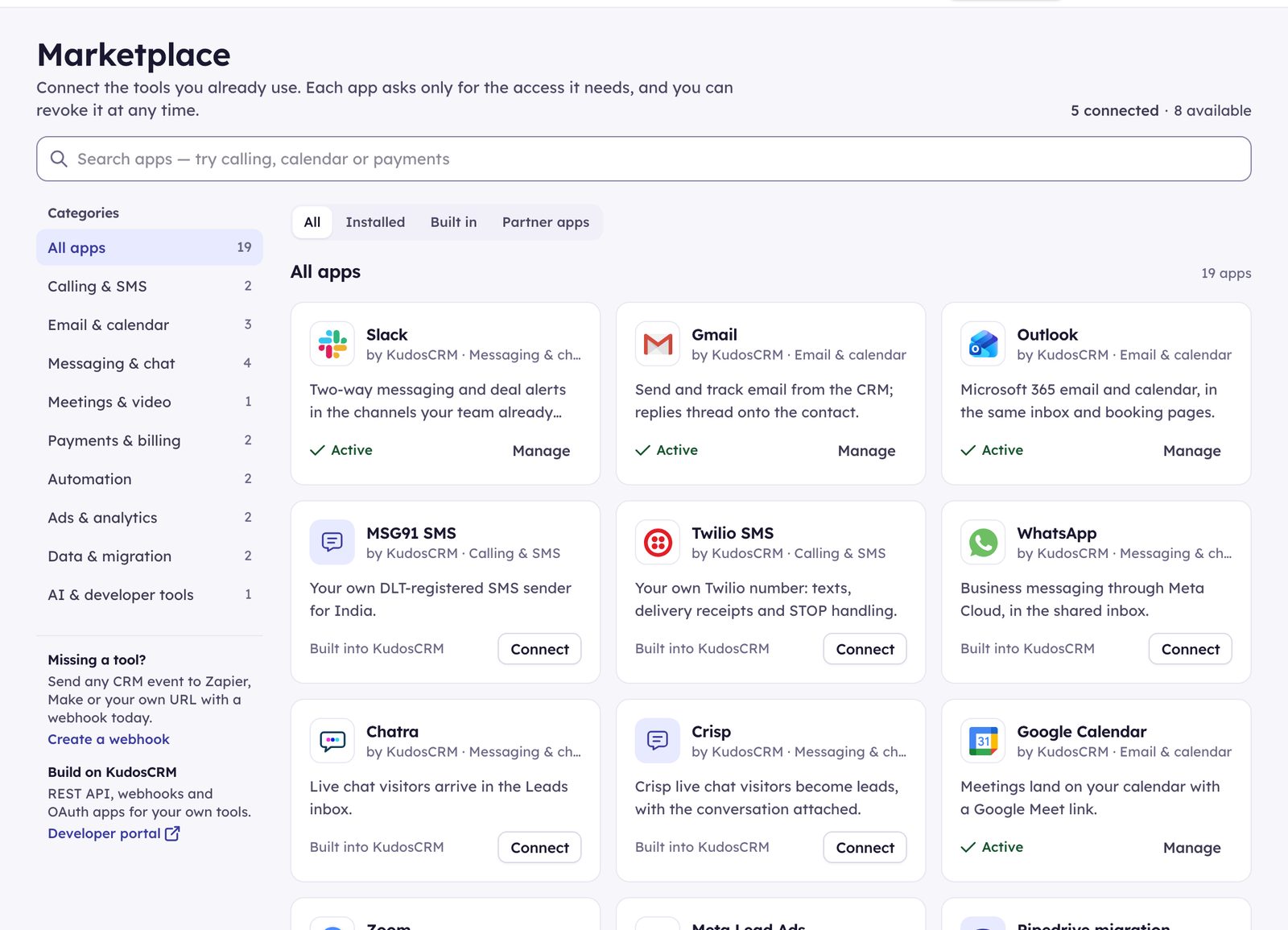
Open Settings → Marketplace
Live tools show a Connect button. Click it on the Gmail card.
- 2
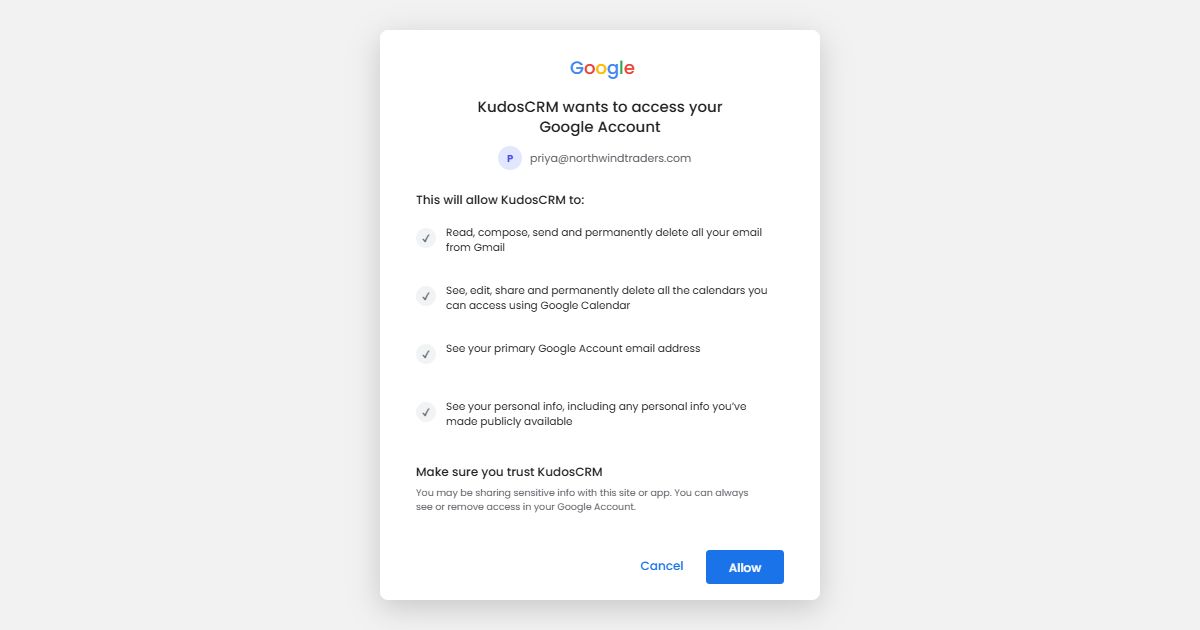
Sign in with Google and allow access
Google's consent screen lists the permissions. Allow and the window closes.
- 3
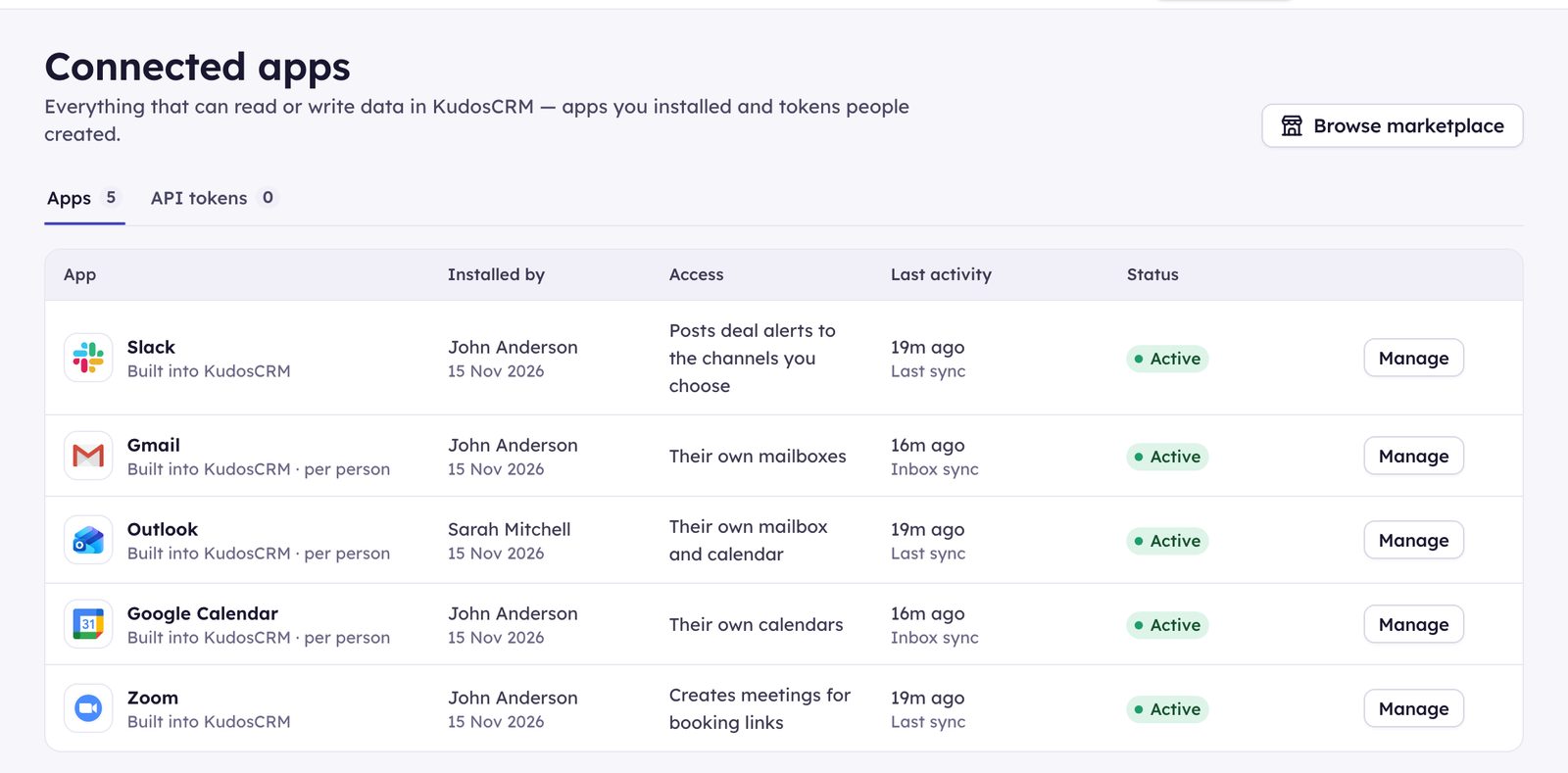
Check it in Connected apps
Gmail shows as connected. Open it to test the connection or read the first sync.


Go Deeper
Features a Connected Mailbox Powers
Works Well With
Pair Gmail With Calendar and Team Alerts
 Google Calendar
 Slack
 Zoom
 Outlook
On Microsoft 365 instead? The Outlook CRM integration works the same way.
FAQ
Frequently Asked Questions
Start free today
Connect Gmail to Your CRM in About Two Minutes
Sign in with Google, allow access, and your next customer email lands on the right record. The Free plan includes one inbox.